


Exei is not just another web application – it is a scalable, multi-tenant, frontend-heavy platform built to handle real-world complexity. Exei’s frontend coordinates a large number of moving parts.
As the product evolved, one issue consistently surfaced: state management.
What began as a few useState hooks quickly turned into deep prop drilling, duplicated logic, and unpredictable UI behavior. Visually distant components became tightly coupled through state dependencies. A simple requirement like keeping the active project in sync across the navbar, dashboard, and editor became fragile and error-prone.
At that point, the question was no longer how to store state, but how to scale state safely.
That challenge led to Redux integration in Exei, using modern Redux with Redux Toolkit (RTK). This article explains why Redux was chosen, the process of integrating Redux with React and Next.js, and how it fundamentally improved Exei’s frontend architecture.
What Is Redux (The Modern Era)
If Redux still feels verbose or outdated, that perception usually comes from legacy Redux patterns.
Modern Redux, powered by Redux Toolkit, focuses on predictability, structure, and developer experience without boilerplate.
Core principles remain unchanged:
- Single Source of Truth – The global store represents the entire application state.
- Immutable State Updates – State transitions are predictable and controlled.
- Unidirectional Data Flow – Actions describe what happened, reducers describe how state changes.
Redux Toolkit modernizes Redux by providing:
- createSlice for co-locating reducers and actions
- Immer for safe mutable-style updates
- Built-in TypeScript support
- Standardized async handling
The result is a system that is explicit, debuggable, and scalable, exactly what Exei requires.
Why Exei Needs Redux
In Exei, the state is not limited to UI toggles. It represents a business context.
Cross-Component State Sharing
The navigation layer, dashboard, and editor all depend on shared state such as:
- Logged-in user information
- Tenant (client) context
- Active project selection
These components do not share a direct parent-child relationship. Redux allows any component to access global state directly, eliminating prop drilling and hidden dependencies.
Multi-Step and Cross-Route Workflows
Onboarding flows and project creation span multiple routes and user interactions. Redux stores this transitional state, so progress is preserved across navigation and reloads.
Authentication and Multi-Tenancy
Exei is multi-tenant by design. Every API request depends on authentication tokens and client context. Redux centralizes this logic in a dedicated userSlice, ensuring all API interactions remain tenant-aware without leaking implementation details into UI components.
Debugging and Observability
Redux DevTools provide full visibility into:
- Dispatched actions
- Payloads
- State transitions over time
This observability is critical for debugging production issues and supporting Redux integration testing workflows.
Why Redux Over Other State Management Tools
Several alternatives were evaluated before choosing Redux.
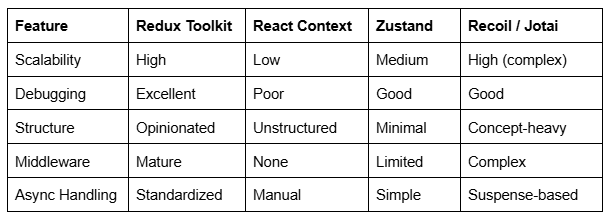
Conclusion: Redux provides the structure, tooling, and predictability required for a large, multi-tenant application like Exei.
Pros and Cons of Redux
Pros
- Predictable and traceable state updates
- Best-in-class DevTools
- Strong TypeScript support
- Clear separation of UI and business logic
- Excellent fit for Redux integration with React and Next.js
Cons (and Mitigation)
- Initial setup cost → mitigated by Redux Toolkit
- Learning curve → mitigated by enforcing modern patterns
- Overkill for small apps → Exei exceeds that scope
Redux Architecture in Exei
Exei follows a feature-based slice architecture.
Key slices include:
- UserSlice – authentication, tokens, tenant context
- ProjectSlice – active project state
- DocsSlice – documentation editor state
- NavbarSlice – navigation UI state
Each slice owns its domain, enabling parallel development and clean separation of concerns.
End-to-End Redux Integration in Next.js (App Router)
This section demonstrates the process of integrating Redux with React using Next.js App Router.
a. Install Dependencies
npm install @reduxjs/toolkit react-redux
b. Store Setup (src/store/store.ts)
					import { configureStore } from "@reduxjs/toolkit";
import userSlice from "../slices/userSlice";
import projectSlice from "../slices/ProjectSlice";
export const makeStore = () => {
  return configureStore({
    reducer: {
      userReduce: userSlice,
      activeProject: projectSlice,
    },
  });
};

export type AppStore = ReturnType<typeof makeStore>;
export type RootState = ReturnType<AppStore["getState"]>;
export type AppDispatch = AppStore["dispatch"];
c. Creating a Slice (src/slices/userSlice.ts)
					import { createSlice, PayloadAction } from "@reduxjs/toolkit";
import { UserData } from "../types/user";

interface UserState {
  user?: UserData | null;
  token?: string | null;
}

const initialState: UserState = {};

const userSlice = createSlice({
  name: "auth",
  initialState,
  reducers: {
    setUserReducer(state, action: PayloadAction<{ user: UserData; token: string }>) {
      state.user = action.payload.user;
      state.token = action.payload.token;
    },
    clearUserReducer(state) {
      state.user = undefined;
      state.token = undefined;
    }
  },
});

export const {
  setUserReducer,
  clearUserReducer,
} = userSlice.actions;

export default userSlice.reducer;
d. Providing Redux to Next.js (src/app/StoreProvider.tsx)
					'use client';

import { useRef } from "react";
import { Provider } from "react-redux";
import { makeStore, AppStore } from "../store/store";

export default function StoreProvider({ children }: { children: React.ReactNode }) {
  const storeRef = useRef<AppStore>();

  if (!storeRef.current) {
    storeRef.current = makeStore();
  }

  return <Provider store={storeRef.current}>{children}</Provider>;
}
Wrap the root layout:
					// src/app/layout.tsx
import StoreProvider from "./StoreProvider";

export default function RootLayout({ children }: { children: React.ReactNode }) {
  return (
    <html lang="en">
      <body>
        <StoreProvider>{children}</StoreProvider>
      </body>
    </html>
  );
}
e. Using Global State
					import { useDispatch, useSelector } from "react-redux";
import type { RootState, AppDispatch } from "./store";

export const useAppDispatch = () => useDispatch<AppDispatch>();
export const useAppSelector = <T>(selector: (state: RootState) => T) => useSelector(selector);
Example usage:
					'use client';

import { useAppSelector } from "@/hooks";

const UserProfile = () => {
  const { user } = useAppSelector(state => state.userReduce);

  if (!user) return <div>Please log in</div>;

  return (
    <div>
      <h1>Welcome, {user.firstName}</h1>
    </div>
  );
};
f. Updating Global State
					'use client';

import { useAppDispatch } from "@/hooks";
import { setUserReducer } from "@/slices/userSlice";

const LoginButton = () => {
  const dispatch = useAppDispatch();

  const handleLogin = (response: any) => {
    dispatch(
      setUserReducer({
        user: response.user,
        token: response.token,
      })
    );
  };

  return <button onClick={handleLogin}>Log In</button>;
How Redux Improves Exei
- Cleaner component tree
- Predictable state transitions
- Reduced coupling
- Safer refactors
- Easier Redux integration testing
Best Practices Used in Exei
- Feature-based slices
- Minimal global state
- Redux Toolkit only
- Typed selectors and dispatch
- Clear naming conventions
- Selector abstraction for refactor safety
Conclusion
Redux was chosen for Exei not because it is fashionable. It was chosen because, as the product grew, we needed something predictable, explicit, and hard to misuse.
In a multi-tenant platform like Exei, state isn’t just UI data; it’s user identity, tenant context, and long-running workflows that stretch across routes and features. Once that reality set in, treating state as an afterthought was no longer an option. It had to be treated as architecture.
Redux Toolkit gave the structure to do that without slowing development down. State changes are easy to follow, bugs are easier to trace, and refactors feel safer because the rules are clear. More importantly, the app behaves consistently, even as complexity increases.
Redux isn’t old or obsolete. It’s proven. And for Exei, it became the backbone that lets the frontend grow without quietly accumulating chaos.


